Common Localization Mistakes And How to Avoid Them

Common Localization Mistakes in E-Commerce Website Translation
Translation is a key driver of global growth. When it comes to growth, e-commerce represents a massive market opportunity. One of the fundamental principles of consumer buying behavior is trust—customers need to feel confident before making a purchase. There is no better way to build this trust than by communicating in their own language and ensuring they fully understand every detail about your products or services. According to Common Sense Advisory, 65% of customers prefer content in their native language.
Based on this, e-commerce website translation has become essential for reaching and converting global audiences—especially as the global e-commerce market reached approximately USD 4.12 trillion in 2021 and is expected to grow to USD 6.48 trillion by 2029, at a compound annual growth rate (CAGR) of 9.49%.
Mistakes in E-Commerce Website Translation and Localization
Many companies and interpreters have misconceptions about e-commerce website translation and localization when planning to expand globally. This needs to be clarified. If you want your website to communicate effectively with a global audience, it must be localized not merely translated word for word. Many unprofessional agencies and translators make common mistakes when handling e-commerce website translations. Even when attempting to cut costs by using free tools or low-cost translation subscriptions, these options are still not efficient enough. All of this leads to a poor user experience, which can ultimately result in cart abandonment in local markets. Below are some of the most common mistakes.
Reliance on Translation Tools
Many generic translation tools, such as Google Translate, cannot fully understand context, which makes it unreliable to depend on automated tools without human guidance. While AI tools may produce better results, they can still cause misunderstandings without human review—such as incorrect product names or unclear descriptions. Even slogans must be carefully adapted to align with the local audience’s culture. For this reason, human input from professional native speakers is irreplaceable in e-commerce translation and localization.
Saudisoft’s language experts supervise the process to ensure content quality and contextual accuracy in the target language, even for translation projects that rely on AI or other translation tools.
Ignoring Cultural Context:
At this point, the difference between simple translation and full localization becomes clear. One of the most common mistakes in e-commerce website translation is poor knowledge of the target market, which can result in translations that conflict with local cultural values. For example, when a new cough medicine was launched in the German market, its name was changed from “Vicks” to “Wick” to avoid an inappropriate meaning. Another example of effective website localization is using “Hola” instead of “Hello” in Spanish-speaking markets.
As mentioned, localization goes beyond text. Visuals must also align with the audience’s culture, as a photo that works for an American audience may conflict with the ethics or traditions of a Japanese audience.
At Saudisoft, we take into account all cultural contexts for text, slogans, visuals, and audience preferences, ensuring high-quality localization with the help of our native-speaking translators.
Linguistic and regional variations
Many countries share the same language. English, for example, is the main language in the USA, the UK, and Canada. However, this does not mean that meanings or terms are identical. For instance, “flat” and “apartment” have the same meaning, but “flat” is more common in the UK, while “apartment” is used in the US and Canada. This issue is not limited to different countries; it also applies to countries with multiple dialects or regional languages, such as India, which has many distinct cultures as a subcontinent.
At Saudisoft, we pay special attention to these nuances due to the consequences of ignoring language sensitivities, ensuring the best results for e-commerce website translation and localization.
Ignoring seasonal discounts and promotions:
Seasonal discounts are a vital aspect of the e-commerce industry, and ignoring them is a common mistake in e-commerce website localization. Like all elements of localization, they need to align with the audience’s culture to achieve the best results and drive more sales. For example, in Arabic-speaking countries, Ramadan and Eid are peak shopping seasons, while in European or Western countries, the New Year and Christmas periods are the ideal time for promotions.
Using Wrong Currencies, Units measurement or payment methods:
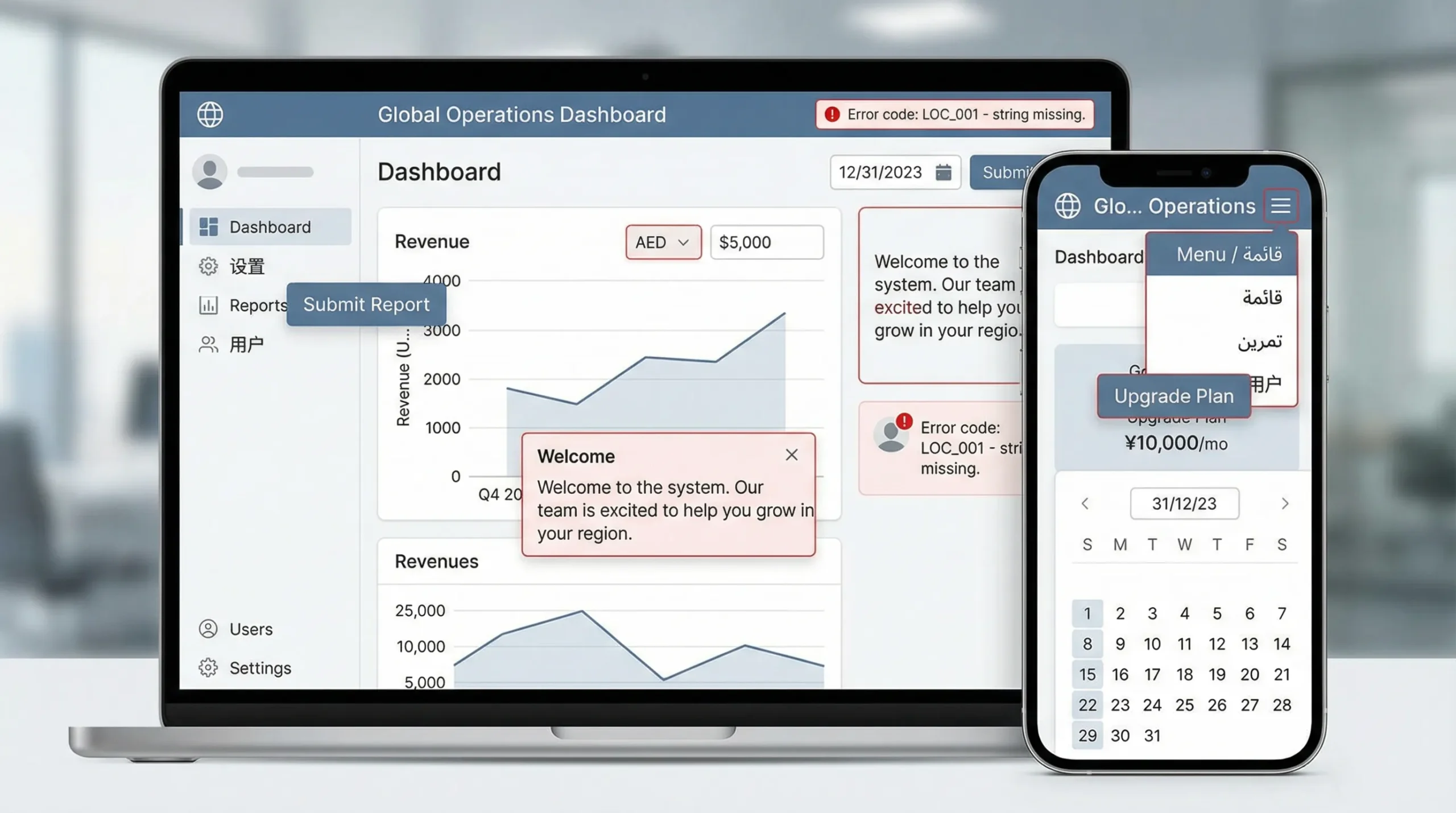
One of the main differences in global systems is measurement units, and this is one of the factors that can determine whether customers complete a purchase or leave the website. For example, if you use the Imperial system and want to enter the Saudi market, you should convert your Saudi version to the metric system, as the Saudi audience may not understand inches or pounds. This can cause inconvenience and lead them to leave the website. The same applies to currency and payment methods. If you don’t use local standards, customers may have concerns -especially when providing their credit cards or converting to another currency- since payment is one of the areas where people have the most worries.
Ignoring SEO (Search Engine Optimization)
At the moment, many customers search for products that you already offer. However, if they search in their own language and region—which is likely happening—while your website is outside of that area, they will not find you. Even if your website is translated, search engines often prefer original content over translated content.
Saudisoft overcomes this challenge with multilingual SEO, which optimizes your website for different languages and cultures. This means your products or services are now visible to people searching with local keywords. Multilingual SEO attracts users who use the same keywords you use for your products in any targeted market and avoid common localization mistakes.
In addition, cross-cultural keyword research acts as a bridge between you and your audience. It helps you understand search behaviors and cultural idioms, allowing you to align your website with the audience’s culture and preferences and become one of the local websites in your target market.
Ignoring writing systems and text directions
One common mistake in e-commerce website translation is ignoring writing systems, as they differ across languages. For example, Arabic is written from right to left, whereas English is written from left to right. Without proper localization, this can lead to layout and design issues on e-commerce websites. The same applies to fonts, as some support certain languages but not others, for example, Japanese or Chinese potentially affecting readability and the overall user experience.
Once you avoid these mistakes and enhance your website, congratulations! You will have a well-localized website that is visible to the global audience you are targeting. Achieving this is possible with the help of professional native-speaking translators.